DA Monitor
Centralized Drive Health Monitoring Across Systems
A free desktop application that aggregates drive‑health alerts from multiple DA Drive Analyzer installations and user accounts into one unified dashboard.
What DA Monitor Is and When You Need It
What DA Monitor Is
DA Monitor is a free desktop application that displays drive health alerts generated by DA Drive Analyzer applications. It centralizes AI-based drive failure predictions and threshold alerts from multiple systems and users into one clear dashboard.
DA Monitor does not analyze drives or generate predictions on its own. It only displays alerts already produced by DA Drive Analyzer products.
When You Need It
-
Monitor drives across Windows PCs, QNAP NAS, and ASUSTOR NAS devices from one interface.
-
View alerts from multiple user accounts simultaneously
-
Quickly identify drives at moderate or severe risk
-
Reduce the need to log into individual PCs or NAS systems
Especially useful for:
What DA Monitor Does (and Does Not Do)
DA Monitor allows users to:
- View AI-based drive failure alerts
- View threshold-based alerts
- Monitor alerts from multiple systems and user accounts
- Track alert history in a single dashboard
DA Monitor does not:
- Predict drive failures on its own
- Collect drive health data
- Replace DA Drive Analyzer or NAS applications
DA Monitor is a monitoring dashboard — not an analysis engine.
Getting Started with DA Monitor
From installation to live monitoring in minutes.
Empty Dashboard
After installation, the DA Monitor dashboard starts empty.
Add Accounts
Add one or more user accounts that are already running a DA Drive Analyzer application.
Live Monitoring
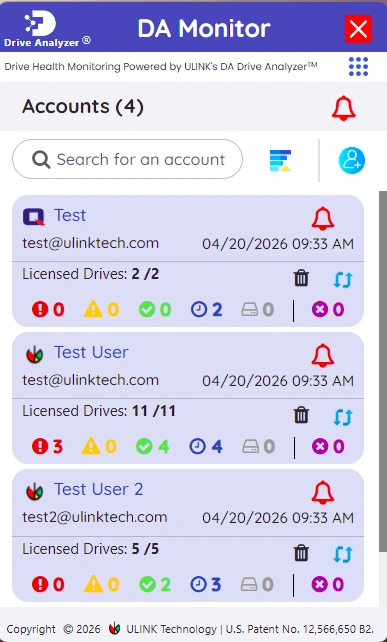
Once accounts are added, drive health alerts are received automatically and all monitored systems are shown in one dashboard.
DA Monitor does not collect drive health data. It only displays alerts generated by DA Drive Analyzer applications.
Downloads
Get DA Monitor for Windows or macOS
Automatic updates are enabled. Manual downloads are only required if auto-update fails.
Help & Documentation
Built by Storage Experts at ULINK
DA Monitor is developed and maintained by ULINK Technology, a company specializing in storage drive diagnostics and AI-based failure prediction. DA Monitor is part of ULINK's DA Drive Analyzer platform, designed to help users detect drive issues early and reduce the risk of data loss across PCs and NAS systems.