DA Drive Analyzer now covers Windows PC, Windows Server, QNAP NAS, ASUSTOR NAS, and macOS. Here is how IT teams can bring all of it under one monitoring framework.
Introduction
Most IT environments are not uniform. A typical setup might include Windows workstations, Windows Server, one or more NAS devices for shared storage, and an increasing number of Mac machines used by designers, editors, or executives.
Each of those environments has drives. Each of those drives can fail. And until recently, there was no single monitoring solution that covered all of them under the same AI-powered prediction engine, one that helps predict drive failures before they happen.
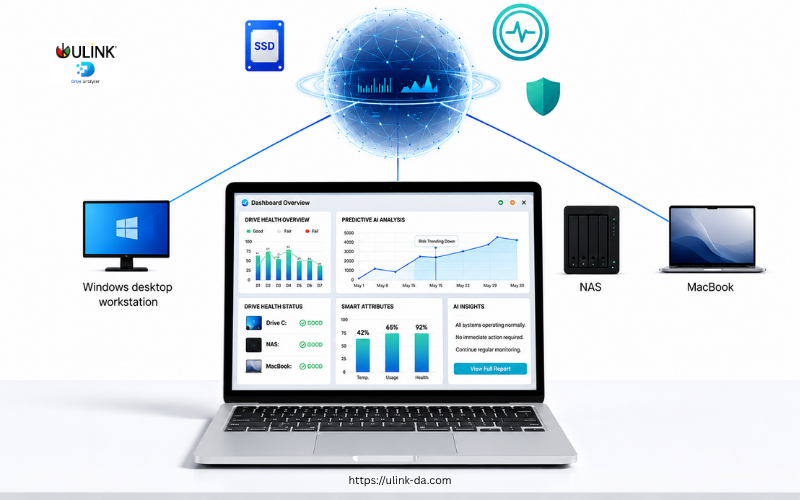
DA Drive Analyzer now runs across Windows PC, Windows Server, QNAP NAS, ASUSTOR NAS, and macOS Monterey (Version 12) and onwards. For IT administrators managing mixed environments, that changes what proactive drive health monitoring looks like in practice.
The Problem With Monitoring Mixed Environments
Drive health monitoring in a mixed environment is rarely a solved problem. Most tools are platform specific. A utility that works on Windows does not extend to NAS. A NAS monitoring tool does not cover Mac endpoints. IT teams end up with fragmented visibility, different alert systems per platform, and no single source of truth for drive health across their infrastructure.
The consequence is inconsistency. High risk drives go undetected not because monitoring is absent but because coverage has gaps.
DA Drive Analyzer addresses this by running the same AI prediction engine across every supported platform. The monitoring logic, the health signals evaluated, and the failure prediction model are consistent regardless of whether the drive is in a Windows workstation, a NAS, or a Mac.
Platform Coverage at a Glance
DA Drive Analyzer currently supports the following environments:
Windows PC and Windows Server, monitoring both internal and externally attached SATA, NVMe, and SAS drives in either Cloud Mode or fully offline Standalone Mode.
QNAP NAS, available via the QNAP App Center, monitoring drives installed in QNAP NAS devices.
ASUSTOR NAS, available via the ASUSTOR App Central, monitoring drives installed in ASUSTOR NAS devices.
macOS, starting with macOS Monterey (Version 12) and onwards, monitoring internal SATA, NVMe, and SAS drives. USB-attached drives are not supported in this release.
Across all platforms, DA Drive Analyzer supports HDDs and SSDs and works with 99% or more of commercially available drive models.
How Centralized Monitoring Works: DA Portal and DA Monitor
This is where DA Drive Analyzer moves from individual drive monitoring to fleet-level visibility, which is where it becomes most useful for IT teams.
DA Portal is the cloud dashboard available in Cloud Mode. It provides a centralized view of AI predictions, drive health metrics, alert history, and drive counts across all connected devices and users. IT administrators can monitor drive health status across their environment from a single dashboard without needing to check each machine individually.
DA Monitor is a free desktop application available for Windows and Mac. It displays DA Drive Analyzer’s AI-based drive health predictions and threshold-based alerts for multiple systems and multiple users simultaneously. An administrator adds each user they want to monitor and views their drive health alerts in a single window. Each user needs to be running a DA Drive Analyzer application for their system to appear in DA Monitor.
Together, DA Portal and DA Monitor give IT teams two layers of visibility: a cloud-based dashboard for remote access and reporting, and a local desktop tool for direct monitoring across accounts.
Cloud Mode vs Standalone Mode: The IT Decision
For an IT deployment context, the decision comes down to one question: does your environment allow data to leave the device?
If yes, Cloud Mode is the natural fit. It enables DA Portal access, email and in-app alerts, weekly drive health reports, and fleet-level visibility through DA Monitor.
If no, Standalone Mode processes all drive health data locally on the device. No data leaves the machine. The AI model runs on-device with no cloud uploads of any kind, making it appropriate for air-gapped environments, privacy-sensitive infrastructure, or regulated environments where data must not leave the local network.
Both modes include the full AI prediction engine. The choice is about data handling, not protection level.
Alerts and Risk Levels Across the Fleet
When a drive reaches a risk level, IT teams receive alerts through the channels available in their chosen mode: email and in-app for Cloud Mode, in-app only for Standalone Mode.
Drive health is categorized into clear risk levels: Healthy, Moderate Risk, and Severe Risk, giving IT teams an immediately actionable view of where attention is needed across their environment without having to interpret raw drive data.
Privacy and Compliance
DA Drive Analyzer analyzes drive health only. No user files, documents, or personal data are accessed or transmitted. Only anonymized drive health metrics such as S.M.A.R.T. attributes, temperature, and performance signals are analyzed. DA Drive Analyzer is GDPR compliant.
Getting Started
Install DA Drive Analyzer on each machine or NAS device, activate the license, and select Cloud Mode or Standalone Mode. The application begins collecting drive health data automatically from there. For Cloud Mode users, all connected devices appear in DA Portal once activated. DA Monitor can be installed on any Windows or Mac machine to provide a local fleet view alongside the cloud dashboard.
A 7-day free trial is available with full access to all features. No credit card is required.
Closing
Mixed environments are the norm for most IT teams, not the exception. DA Drive Analyzer brings the same predictive monitoring framework to every major platform in a typical IT environment. Windows, NAS, and Mac can now be monitored under the same AI engine, with centralized visibility through DA Portal and DA Monitor, and the flexibility to operate fully offline where the environment requires it.
Predict Drive Failure Before It Happens with Our Drive Health Checker
AI-powered drive health monitoring and diagnostic software for HDD & SSD drives on Windows PC, ASUSTOR NAS, and QNAP NAS
Try DA for Windows PCTry DA for ASUSTOR NASTRY DA for QNAP NAS